
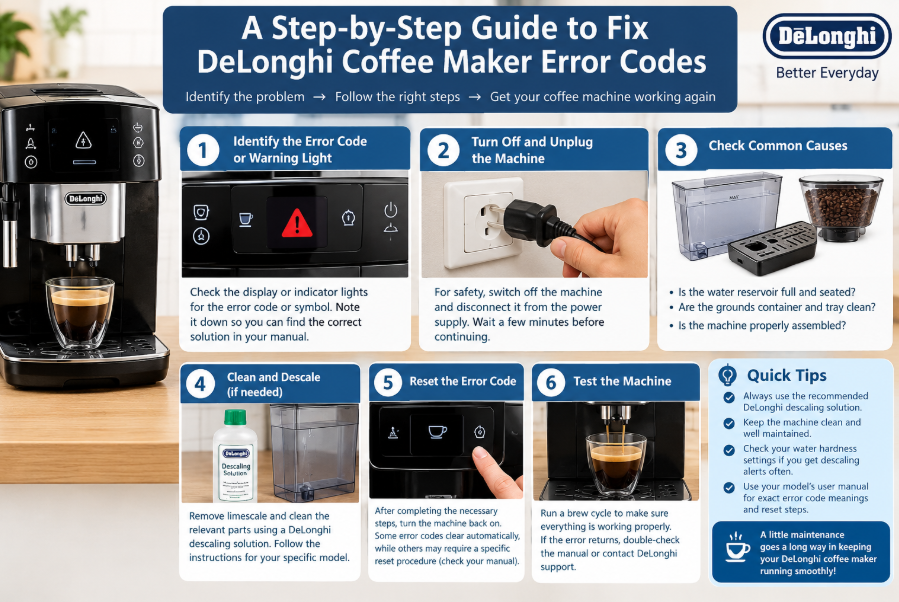
Fix DeLonghi Coffee Maker Errors Code: DIY Troubleshooting Guide
DeLonghi coffee machines make it easy to enjoy espresso and coffee at home, but flashing warning lights and unexpected errors can interrupt your morning routine. Fortunately, many common problems have simple solutions that you can try before contacting the technician.
If your DeLonghi Magnifica displays a red triangle, your grounds container light keeps flashing, or your machine needs descaling, the first step is understanding what the warning means. Different models, including the Magnifica S, Magnifica Start, Dedica, Dinamica, and La Specialista, use different indicators and troubleshooting procedures.
In this guide, we explain practical troubleshooting methods based on common DeLonghi problems. You will learn how to interpret warning lights, clean important components, address descaling alerts, and identify when professional service may be necessary.
1. Understand Common DeLonghi Coffee Maker Warning Lights
De’Longhi machines communicate through symbols rather than text. A single light can have several meanings, and the same symbol can behave differently across the Magnifica, Dedica, Dinamica and Specialista ranges. Before you call a repair service, work through the checks below. Most of them take only a few minutes and need no tools.
Before attempting a repair, check which indicator is illuminated or flashing. A warning light does not always mean that a component has failed. Sometimes, the machine simply needs routine maintenance or cannot detect that a removable component has been correctly installed.
- Descaling light: Indicates that the machine requires a descaling cycle.
- Grounds container light: May indicate that the coffee grounds container needs emptying or that the machine has not detected the container correctly.
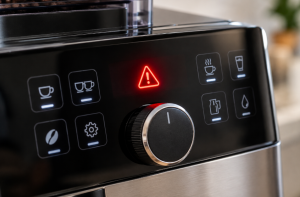
- Red triangle or general alarm: Indicates a warning that requires further investigation according to the model’s instructions.
- Water light: May indicate an empty reservoir, incorrect reservoir installation, or a water delivery problem.
- Flashing steam or temperature indicators: Their meaning depends on the particular machine and its operating state.
For an accurate DeLonghi ECAM error code list and solutions, consult the user manual for your exact model. Similar-looking lights can indicate different conditions on different machines.
Safety First Instruction
- Always unplug the machine before putting your hand inside it.
- Never force removable parts that feel stuck.
- Let the machine cool down before cleaning internal areas.
2. How to Fix a DeLonghi Magnifica Descaling Light
If you are wondering how to fix a DeLonghi Magnifica general maintenance warning, first determine whether the illuminated symbol is the descaling indicator. On the Magnifica Start, the light indicates that descaling is required.
Why the descaling light turns on
Mineral deposits from water gradually accumulate inside a coffee machine. Hard water generally contributes to faster scale buildup, which can interfere with water flow and heating performance.
The machine’s water-hardness setting also affects how frequently it requests descaling. Here, the machine was set to very hard water, which suited the local water supply. If your water is softer, check your manual for instructions on adjusting the hardness setting.
How to descale your DeLonghi machine
- Check your model’s manual to confirm the correct descaling procedure.
- Use the manufacturer’s recommended descaling solution for your machine.
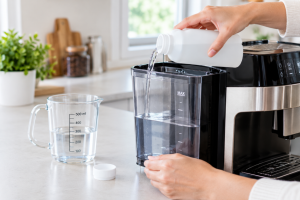
- Prepare the water reservoir as instructed, adding the descaling solution and water in the specified quantities.
- Start the designated descaling program and follow the machine’s prompts.
- Complete the required rinsing cycles with fresh water.
Choose a DeLonghi descaling solution for Magnifica machines that is approved for your model. Avoid guessing the solution concentration or substituting household cleaners without checking the manufacturer’s guidance.
DeLonghi coffee maker descale light won’t turn off
If the descale light remains illuminated after cleaning, check whether the complete descaling and rinsing procedure was performed. Some machines require the cycle to reach its final confirmation step before the indicator resets.
Follow the instructions for your specific model rather than repeatedly starting descaling cycles. If the light remains on after the prescribed procedure, consult the manual or contact DeLonghi support.
3. Fix a DeLonghi Magnifica Red Triangle Warning
A red triangle can be frustrating because it may prevent the machine from preparing coffee. At this point, switching the machine off and restoring power can clear the warning, although the exact cause may not established.
Try a safe power reset
- Switch the coffee machine off using its normal controls.
- Disconnect it from the power supply.
- Wait briefly before reconnecting it.
- Restore power and switch the machine on again.
- Observe whether the warning disappears and the machine completes its startup routine.
This is a basic troubleshooting step, not a guaranteed repair. If you need to fix a DeLonghi Magnifica red triangle alert when the machine won’t turn on, check the power supply and follow the manufacturer’s instructions. Persistent warnings may indicate a problem that requires service.
Never open the machine’s electrical housing or touch internal electrical components while it is connected to power.
4. DeLonghi Coffee Machine Grounds Container Light Flashing Red
One useful troubleshooting example involves a DeLonghi Magnifica S whose grounds container warning continued flashing even though the container was empty. The residue around the container’s detection mechanism is a possible explanation.
Step-by-step troubleshooting
- Switch off and unplug the machine before cleaning areas near internal mechanisms.
- Remove the drip tray and coffee grounds container according to the manual.
- Empty the grounds container and wash the removable tray components as permitted by the manufacturer.
- Clean and dry the accessible surfaces, including the area where the tray sits.
- Check for loose coffee grounds around the container’s contact or detection area.
- Reinstall the components correctly and check whether the warning clears.
Why the warning may persist
The cause may be from the accumulated coffee grounds were interfering with a small microswitch. The switch appeared to respond when the mechanism was pressed, but debris may have prevented it from operating correctly.
This is an observation from an individual machine, not confirmation that every Magnifica model uses the same detection system. Avoid inserting metal tools, forcing a switch, or disassembling the machine to reach internal components.
If the DeLonghi coffee machine grounds container is flashing red after proper cleaning and reinstallation, the detection mechanism may need inspection by a qualified technician.
5. Fix a DeLonghi Coffee Machine That Is Not Brewing
A DeLonghi coffee machine not brewing can have several possible causes. Before assuming that the pump, grinder, or heating system has failed, check the basic components.
Check the water reservoir
- Confirm that the reservoir contains enough fresh water.
- Make sure it is seated correctly in its holder.
- Check for visible obstructions around the accessible water outlet.
- Follow your model’s priming instructions if the water circuit needs to be filled.
Investigate a possible blockage
If water is available but coffee does not come out, the problem could involve a blocked coffee outlet, scale buildup, or an issue with the brewing mechanism. Clean accessible coffee outlets according to the manual and perform descaling when the machine requests it.
For fixing a clogged DeLonghi Magnifica with no water coming out, begin with the reservoir and the model-specific water-circuit instructions. Do not repeatedly run the pump if the machine is making unusual noises or cannot draw water.
DeLonghi Dedica not pumping water troubleshooting
For a Dedica that will not deliver water, verify the reservoir position, inspect accessible outlets, and check whether the machine needs priming or descaling. If the pump runs without delivering water, or does not run at all, further diagnosis may be necessary.
DeLonghi Dinamica water circuit empty error fix
A water-circuit warning may require the machine to refill or prime its internal water path. Follow the exact on-screen or indicator-light instructions in the Dinamica manual. Confirm that the reservoir is filled and correctly installed before starting the prescribed procedure.
Never force water through the system or dismantle pressurized components to clear an obstruction.
6. Fix a DeLonghi Infuser That Is Stuck
The infuser, also called the brewing unit on certain models, is responsible for handling ground coffee during the brewing process. If it becomes stuck, the machine may display an error or refuse to complete its startup routine.
How to fix a stuck infuser on DeLonghi Magnifica S
- Switch off the machine and follow the manual’s shutdown procedure.
- Allow the machine to finish its normal shutdown sequence before disconnecting power.
- Open the service door only as instructed by the manufacturer.
- Check whether the brewing unit is in the correct position for removal.
- If the unit is removable, follow the manual’s cleaning and reinstallation instructions.
Do not force the infuser out of position. Some machines move the brewing mechanism automatically during startup and shutdown, and attempting to remove it at the wrong time can cause damage.
If you need to fix a DeLonghi coffee machine infuser that remains stuck, or the machine displays the same warning after a restart, consult model-specific instructions or arrange professional servicing.
7. Troubleshooting DeLonghi Grinder Problems
A grinder error may prevent an automatic coffee machine from preparing a drink. Coffee beans, accumulated grounds, or a mechanical fault can affect grinder operation.
DeLonghi Magnifica S grinder error fix
- Check that the bean hopper contains suitable, dry coffee beans.
- Look for visible foreign objects in accessible areas.
- Follow the manufacturer’s cleaning procedure for the grinder.
- Check whether the machine reports a separate general alarm.
Avoid inserting fingers or tools into the grinder. Disconnect power before performing any cleaning that requires access to a potentially moving mechanism.
Fix DeLonghi La Specialista not grinding
For a La Specialista that does not grind, check the bean supply, hopper installation, and any visible obstruction you can safely address using the manual. If the grinder remains silent, repeatedly stops, or produces an unusual noise, discontinue use and seek service.
DeLonghi La Specialista low-pressure error fix
Low pressure during espresso extraction can result from several factors, including grind size, coffee dose, tamping, or a water-delivery problem. Check the recommended grind settings and preparation procedure for your specific model.
If the machine’s pressure remains abnormal after checking these factors, use the manufacturer’s troubleshooting instructions rather than assuming that a grinder adjustment will resolve every pressure problem.
8. DeLonghi Dedica Flashing Error Lights: What They Mean
The meaning of DeLonghi Dedica flashing error lights depends on the exact model and the pattern of illumination. A flashing indicator may relate to heating, descaling, water delivery, or another operating condition.
To investigate the error:
- Record which lights are flashing and whether they flash together or separately.
- Check the manual’s explanation for that exact pattern.
- Confirm that the reservoir is filled and installed correctly.
- Check whether a descaling cycle is required.
- Allow the machine to complete its normal heating procedure.
For anyone wondering how to fix a DeLonghi coffee machine water light flashing, the first step is to distinguish an empty reservoir from a water-circuit or flow problem. The light pattern alone is not enough to identify a failed component.
9. Other DeLonghi Coffee Machine Problems
DeLonghi coffee machine leaking water underneath fix
Switch off and unplug a machine that leaks water underneath. Check the reservoir for visible damage and confirm that removable components are seated correctly. If water continues to leak, avoid operating the machine until the source has been identified.
DeLonghi coffee maker not heating up repair
If the machine does not heat, verify the power supply and allow the normal startup period to finish. A persistent heating fault may involve an internal component and should be assessed by a qualified technician. Do not open the electrical housing yourself.
DeLonghi espresso machine clogged spout fix
Clean the accessible coffee spouts according to the manufacturer’s instructions. Use the specified cleaning tools where supplied, and avoid pushing sharp objects deep into the outlet. If cleaning does not restore normal flow, further inspection may be required.
DeLonghi general error code reset
A basic power cycle can sometimes clear a temporary warning, but it will not correct every underlying fault. Record the displayed error, check the manual, and follow the specified reset procedure. If the warning returns, treat it as an unresolved problem rather than repeatedly resetting the machine.
Frequently Asked Questions
Why is my DeLonghi Magnifica Start descaling light on?
The indicator means the machine is requesting descaling. Complete the recommended procedure and check your water-hardness setting if the machine requests descaling more frequently than expected.
Why is my DeLonghi Magnifica S grounds light flashing when the container is empty?
Check that the container and drip tray are correctly installed and clean. Coffee residue around the detection mechanism may interfere with operation on some machines, but a persistent warning may require servicing.
Can unplugging my DeLonghi coffee machine fix a red triangle warning?
A power cycle may clear the warning. However, it is not a universal solution. Consult your manual if the warning returns or the machine cannot start normally.
Switch off the main power switch at the back, wait a moment, then switch it on again. This fixed the issue in the original video.
Why does my DeLonghi machine still show the descale light after descaling?
The descaling or rinsing sequence may not have been completed correctly, or the model may require a final confirmation step. Follow the exact reset instructions in the user manual.
Where can I find DeLonghi error codes and their solutions?
Use the official user manual for your exact model number. It provides the most reliable interpretation of warning lights and error messages, along with the correct troubleshooting procedures.
What does the light on my De’Longhi Magnifica S mean?
The descale light means the machine needs descaling. It is a routine maintenance alert rather than a breakdown.
Why is my grounds light flashing when the tray is empty?
The micro switch may be jammed with coffee dust. Unplug the machine, clean around the switch with a toothbrush and reseat the tray firmly.
Does the machine sense how full the grounds tray is?
According to the creator’s observations, it does not. It appears to count coffees made and elapsed time. This is unconfirmed, so check your manual.
How often should I descale?
It depends on your water. Hard water areas need it more often. Set the correct hardness level in the machine settings.
Is it safe to put my hand inside the machine?
Only when it is fully unplugged.
Conclusion: Keep Your DeLonghi Coffee Machine Working Properly
Many DeLonghi coffee maker problems can be investigated with a few simple checks. Start by identifying the warning light, confirming the water reservoir and removable components are installed correctly, cleaning accessible areas, and performing descaling when required.
Remember that troubleshooting steps vary between Magnifica, Dedica, Dinamica, and La Specialista machines.
A solution that works for one model may not apply to another. Always prioritize the manufacturer’s instructions, and seek qualified assistance when a warning persists or a problem involves internal electrical, heating, grinding, or water-pressure components.
Key Takeaways
-
- Identify the exact warning light before attempting a repair.
- Clean the grounds container and accessible tray areas regularly.
- Use the recommended descaling solution and complete every required rinse.
- Check reservoir placement and accessible coffee outlets when water flow stops.
- Never force a stuck infuser or dismantle electrical components while the machine is powered.
- Consult the model-specific manual for persistent warnings and error codes.
- The descale light is a maintenance alert; set the correct water hardness to avoid over-descaling.
- For the red triangle, power off at the back switch and restart.
- A flashing grounds light on an empty tray may indicate a jammed micro switch.
- The machine appears to track coffees and time, not actual grounds volume.
- Always unplug the machine before cleaning inside.
De’Longhi machines communicate through symbols rather than text. A single light can have several meanings, and the same symbol can behave differently across the Magnifica, Dedica, Dinamica and Specialista ranges. Before you call a repair service, work through the checks described by above statements. Most of them take only a few minutes to read and need no tools
