

How to Fix Saeco Error Code E04, E05 & Step-by-Step Brew Group Repair
Saeco coffee machines are designed to make preparing espresso and other coffee drinks convenient at home. However, like any automatic coffee machine, they can develop problems over time. You might notice that your machine stops brewing, produces weak coffee, leaks water, or displays a warning light.
The good news is that many common Saeco coffee machine problems can be diagnosed and resolved with basic troubleshooting. Before arranging a professional repair, it is worth checking the brew group, water supply, grinder, and cleaning condition of your machine.
In this guide, we will look at common Saeco coffee machine problems, explain what may cause them, and walk through practical steps to help get your machine working again.

Before You Start: Safety and Basic Checks
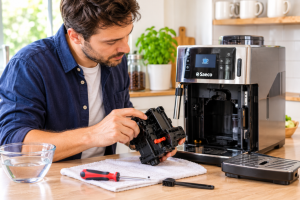
Always unplug the machine before opening it. Take photos of every step and keep screws in a labeled cup. Many Saeco screws are small Phillips or T10 Torx, and one dropped into the grinder can create a bigger problem.
Quick Checklist
- Is the water tank full and seated firmly?
- Is the drip tray and coffee grounds bin in place?
- Is the brew group clean and correctly inserted?
- Has the machine been descaled in the last three months?
As one repair creator puts it, sometimes it really is the simple things. Check these basics first.
Understanding Your Saeco Warning Lights
- Blinking descale light: the machine needs descaling. With regular use, that is roughly every three months.
- Flashing green light: the water is heating up. This is normal.
- Red exclamation point: there is no water. Refill the tank and the light disappears.
After refilling, the machine primes itself. Don’t panic: this noise and pause is normal. If you own a compact model, you can fix Saeco Odea Go maintenance and errors by following this same light-by-light approach, then running a weekly rinse of the brew group.
1. Saeco Coffee Machine Is Not Brewing Coffee
One of the most frustrating problems is when your Saeco coffee machine turns on but does not produce coffee. Sometimes the machine makes noise without dispensing anything. In other cases, water may flow into the drip tray instead of through the coffee outlet.
Possible Causes
- A blocked or dirty brew group.
- Ground coffee stuck inside the brewing mechanism.
- An incorrectly positioned brew group.
- A clogged coffee outlet.
- Air trapped in the water circuit.
How to Fix It
- Turn off the coffee machine and allow it to cool.
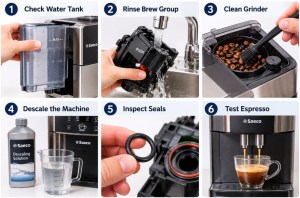
- Remove the water tank and check that it contains enough fresh water.
- Remove the brew group according to your model’s instructions.
- Rinse the brew group under lukewarm running water.
- Remove visible coffee grounds and residue without using harsh cleaning products.
- Allow the brew group to dry before reinstalling it.
- Check that the brew group is correctly positioned and securely locked into place.
- Run a rinse cycle and test the machine again.
If the machine still cannot brew coffee, the water circuit or internal pump may need further inspection.
If your Saeco coffee machine brew group stuck, make sure the machine is switched off, remove the group, rinse it under hot water, let it dry fully, lightly grease it, and reinsert it. Do this weekly to prevent problems.
A frother that won’t froth usually has a clogged nozzle or low steam pressure. Soak the attachment in warm soapy water, then run steam for a few seconds to clear milk residue.
2. Saeco Grinder Is Not Working or Making Unusual Noise
The grinder is responsible for grinding coffee beans before brewing. If it becomes blocked, the machine may produce very little coffee, make an unusual grinding noise, or stop grinding altogether.
Possible Causes
- Oily coffee beans leaving residue inside the grinder.
- Foreign objects accidentally entering the bean hopper.
- Too many coffee beans or coffee grounds obstructing the mechanism.
- A grinder component that has become worn or damaged.
How to Fix It
- Switch off and unplug the coffee machine before inspecting it.
- Remove any remaining coffee beans from the hopper if your model allows it.
- Check for visible debris or foreign objects.
- Clean accessible grinder areas according to the manufacturer’s instructions.
- Use fresh, dry coffee beans rather than excessively oily beans.
- Restart the machine and test the grinder.
Never force the grinder or insert tools into moving parts. If the grinder remains blocked or makes a loud mechanical noise, professional inspection may be necessary.
Why Saeco Grinders Clog
Oily beans are the main reason Saeco grinders jam. The oil gums up the grinding chamber and the horizontal chute where ground coffee exits. Over time, flow stops completely. This is where how to fix Saeco super automatic coffee funnel blockage becomes a key skill.
How to Unclog Saeco Easy
Here is how to unclog Saeco easy with tools you already own:
- Open the top and vacuum out visible beans. Remove the safety piece if your model has one.
- Remove the three screws on top (don’t overtighten when replacing them).
- Lift out the grinder assembly and vacuum the gummed-up chamber, using a spoon to loosen stuck grounds.
- Remove the brew group and open the small door beneath the chute.
- Push a flexible plastic strap or similar tool up through the square chute, moving it back and forth to scrape the sides.
Re-Setting the Burr Grinder Correctly
This is where most people go wrong. Three thin tabs, 120 degrees apart, sit in the threads of the adjustment collar. Turning the collar clockwise lowers the burr for a finer grind; counterclockwise raises it for a coarser one. Mark the orange alignment dots with a paint pen before disassembly. Set the knob to the coarsest setting 18 on reassembly, then adjust finer after testing.
Pro Tip
The first brew after cleaning may fault with a red light because the empty chute takes longer to fill. Turn the machine off and on to reset, add beans and try again.
If you hear Saeco Picobaristo grinder humming not grinding fix type symptoms, the same logic applies. The motor runs but the burrs or chute are jammed, so remove foreign objects and clear compacted grounds.
3. Saeco Coffee Machine Water Error: No Water, Weak Flow or Pump Issue
Water underneath your Saeco coffee machine can indicate a simple maintenance issue or a problem with an internal component. A small amount of water in the drip tray is normal during automatic rinsing, but continuous leaking should not be ignored.
Possible Causes
- A water tank that is not correctly installed.
- A damaged or dirty water tank seal.
- An overfilled or incorrectly positioned drip tray.
- A blocked drainage channel.
- A damaged internal hose or connection.
How to Fix It
- Turn off and unplug the machine.
- Remove the water tank and check for cracks or visible damage.
- Inspect the tank connection and seals.
- Clean the area where the tank connects to the machine.
- Empty and clean the drip tray.
- Reinstall the tank and drip tray correctly.
- Fill the tank and check whether the leak continues.
If water continues leaking from inside the machine, stop using it and arrange professional servicing. Do not open the electrical housing while the machine is connected to power.
Water Not Coming Out
If your Saeco coffee machine no water coming out, check the tank seating, the water filter and scale buildup in the water path. Descaling usually restores flow. Also confirm the brew group is not blocked with coffee residue.
If you are facing a Saeco Picobaristo not pumping water fix, reseat the tank, prime the circuit, descale, and only then suspect the pump. A failing pump may need replacement by a technician.
Error Codes Related to Water
Codes differ by model, so always confirm in your manual. As a general guide, how to fix Saeco error code E05 usually points to water circuit or flow problems: refill, descale, clean the filter and check hoses for kinks. Likewise, Saeco Intelia error code 05 water circuit fix starts with the same checks of tank, filter and descaling. For how to fix Saeco espresso machine E04 error code, inspect the brew group, its seals and the water flow path, since these codes often relate to brewing or flow detection.
Leaks: Bottom, Steam Wand and Under the Machine
First identify where the water is coming from. If it is from the bottom, suspect a faulty gasket or seal. Remove the water tank and drip tray and look for wear. Most gaskets can be ordered online.
- Steam wand leak: a loose connection or worn O-ring. Tighten and replace as needed.
- For Saeco Incanto water leaking from bottom repair, check the tank valve, drip tray and internal hoses.
- To learn how to fix Saeco Xelsis water leak under machine, empty the tank, check the tank seal and look for cracked or loose tubing inside.
Electrical Safety Warning
One technician’s teardown of a Saeco Royal showed a chopped power cable and a missing ground wire. Never run a machine with a damaged cord. Replace it with a properly grounded cable, especially if you have an earth leakage protector at home.
4. Saeco Coffee Machine Is Not Heating Water
If your coffee comes out lukewarm or the machine takes an unusually long time to become ready, the heating system may not be working properly. Mineral deposits from hard water can also affect water flow and heating performance.
Possible Causes
- Mineral scale buildup inside the water circuit.
- An interrupted heating cycle.
- A heating element or temperature sensor problem.
- An internal electrical fault.
How to Fix It
- Check that the machine has completed its startup and heating cycle.
- Make sure the water tank is filled and correctly installed.
- Check whether the machine displays a maintenance or descaling warning.
- Descale the machine using a suitable Saeco-approved descaling product and the instructions for your model.
- Run the recommended rinsing cycle after descaling.
- Test the coffee temperature again.
If the machine still does not heat water, the heating element, thermostat, or temperature sensor may require professional inspection.
On the other side, espresso should be brewed with water around 200°F or 93°C. If it is lukewarm, run a blank shot first to pre-heat the internal parts. If that fails, you may face a heating problem. For a Saeco coffee machine not heating water fix, descale first, then check the thermostat or heating element.
Owners wondering how to repair Saeco Minuto heater element issues should note that the boiler is a sensitive part. Test with a multimeter, and consult a professional if you are not comfortable working with mains voltage.
A Saeco Vienna Plus red light flashing repair often begins with water level, then brew group position, then heating faults.
5. Saeco Coffee Tastes Weak or Watery
When your espresso tastes weak, watery, or lacks its usual aroma, the problem may be related to coffee beans, grinder settings, or the brewing process.
Possible Causes
- Grind settings that are too coarse.
- Stale or low-quality coffee beans.
- Insufficient coffee quantity for the selected drink.
- A dirty brew group.
- Incorrect beverage strength or volume settings.
How to Fix It
- Use fresh coffee beans stored in an airtight container.
- Check the coffee strength setting and increase it if necessary.
- Adjust the grinder gradually toward a finer setting if your model supports this adjustment.
- Only change the grinder setting while the grinder is operating if the manufacturer’s instructions require it.
- Clean the brew group and coffee outlet.
- Try preparing another espresso and compare the result.
Avoid making several grinder adjustments at once. Small changes make it easier to identify which setting improves the coffee extraction.
6. Saeco Coffee Machine Displays a Warning Light or Error Message
Saeco machines use indicator lights and display messages to communicate maintenance requirements or operating problems. Depending on the model, a warning may relate to the water supply, coffee grounds container, drip tray, brew group, or descaling cycle.
Common Checks
- Water warning: Check that the water tank contains enough water and is correctly installed.
- Coffee grounds warning: Empty the coffee grounds container and reinstall it correctly.
- Drip tray warning: Remove, empty, clean, and reinstall the drip tray.
- Brew group warning: Check that the brew group is correctly inserted and locked into position.
- Descaling warning: Complete the descaling procedure described in your model’s manual.
What About Saeco Error Codes?
Error codes and warning symbols can vary between Saeco models. Do not assume that a particular code has the same meaning across every machine. Check the user manual for your exact model before attempting a repair.
If an error remains after following the recommended troubleshooting steps, contact an authorized service center.
7. How to Descale a Saeco Coffee Machine
Mineral deposits can accumulate inside a coffee machine over time, especially when using hard water. Regular descaling helps maintain water flow and heating performance.
Descaling Steps
- Read the descaling instructions for your specific Saeco model.
- Prepare the recommended descaling solution according to its instructions.
- Pour the prepared solution into the water tank as directed.
- Place a suitable container under the coffee outlet and hot-water outlet, if applicable.
- Start the machine’s descaling program.
- Follow the prompts on the display or indicator lights.
- Empty and rinse the water tank when instructed.
- Complete the rinsing cycle using fresh water.
Use a descaling product compatible with your Saeco machine. Avoid substituting vinegar or other household cleaners unless the manufacturer specifically recommends them.
Use a quality Saeco descaling solution and follow the manufacturer’s instructions. If the Saeco coffee machine descale light stays on, complete the full descale cycle, rinse the tank thoroughly and run the reset procedure for your model.
Weekly Routine
- Remove and rinse the brew group under warm running water.
- Empty and clean the grounds container.
- Wipe the drip tray and let all parts dry before reassembling.
8. Saeco Milk Frother Is Not Producing Foam
If your Saeco machine has a milk frothing system, you may occasionally notice that it produces large bubbles, weak foam, or no foam at all. Milk residue is one of the most common reasons for poor frothing performance.
Possible Causes
- Milk residue blocking the frothing components.
- A dirty steam wand or milk circuit.
- Incorrectly assembled milk container components.
- Milk that is unsuitable for the desired foam texture.
How to Fix It
- Turn off the milk frothing function and allow hot components to cool.
- Remove detachable milk-system components according to the manual.
- Clean the parts using the recommended procedure.
- Check for dried milk residue around the steam outlet or frothing nozzle.
- Reassemble the components correctly.
- Use fresh, cold milk and test the frother again.
Clean the milk system after every use to prevent milk residue from building up and affecting performance.
9. How to Fix Saeco Service Error Wrench
A wrench symbol with a service code is one of the most searched problems. If you want to know how to fix Saeco service error wrench warnings, start with the grinder, because that is the usual culprit.
Step-by-Step Wrench Code 1 Fix
- Unplug the machine and remove the bean hopper contents.
- Remove the grinder cover and the parts that block access.
- Clean out the grinder area and the coffee funnel.
- If the code persists, use pliers to gently turn the grinder, as shown in several repair videos, to free any stuck material.
- Reassemble, power on and brew an espresso to test.
In one real case, the funnel cleaning from the manufacturer’s video did not clear the code, but manually turning the grinder freed the jam and the machine brewed normally again.
When Should You Contact a Saeco Technician?
Basic cleaning and maintenance can solve many common coffee machine problems. However, some faults involve internal components that should only be handled by a qualified technician.
Arrange professional servicing if you notice any of the following:
- The machine repeatedly trips the electrical circuit.
- There is a burning smell or visible smoke.
- Water is leaking from inside the electrical housing.
- The grinder makes loud mechanical noises after cleaning.
- The machine does not heat water despite completing basic checks.
- Error messages continue to appear after following the manual.
- The machine stops working even after cleaning and resetting it according to the manufacturer’s instructions.
Always unplug the machine before performing external cleaning or basic inspection. Never attempt to repair internal electrical or pressurized components unless you are qualified to do so.
Frequently Asked Questions
Why is my Saeco coffee machine not dispensing coffee?
A blocked brew group, clogged coffee outlet, trapped air, or water supply problem may prevent coffee from dispensing. Check the water tank, clean the brew group, and run a rinse cycle according to your model’s instructions.
How often should I clean my Saeco coffee machine?
Clean removable parts such as the drip tray and coffee grounds container regularly. Rinse the brew group according to the manufacturer’s recommendations and clean the milk system after every use. Descaling frequency depends on water hardness and the machine’s maintenance indicators.
Can I use vinegar to descale my Saeco coffee machine?
It is best to use a descaling product recommended or approved for your Saeco model. Vinegar may not be suitable for every machine and can leave odors or affect internal components.
Why does my Saeco coffee machine leak water into the drip tray?
Some water in the drip tray is normal because automatic machines release water during rinsing and pressure-release cycles. However, excessive or continuous water accumulation may indicate a drainage, seal, or internal component problem.
Why is my Saeco coffee machine making loud noises?
Unusual noises can come from a blocked grinder, incorrectly installed brew group, or an obstruction in the brewing mechanism. Stop the machine, unplug it, and inspect accessible components according to the manual. Persistent loud noises may require professional servicing.
How do I reset my Saeco coffee machine?
Reset procedures vary by model. Some machines allow settings to be restored through the menu, while others require a specific button sequence. Consult your model’s user manual rather than using a reset procedure intended for a different machine.
Why does my Saeco show a wrench symbol?
It indicates a service issue, commonly a jammed grinder or funnel. Clean both and free the grinder.
How often should I descale my Saeco?
About every three months with regular use, or whenever the light blinks.
Why is my espresso watery?
The grind may be too coarse or the coffee ratio off. Adjust to a finer setting.
Can I fix the grinder myself?
Yes, if you mark the alignment and take photos. Mistakes can be undone by disassembling again.
Conclusion
Many common Saeco coffee machine problems can be resolved with regular cleaning, correct installation of removable components, and basic troubleshooting. A dirty brew group, blocked grinder, low water supply, or mineral buildup can all affect how the machine operates.
Start with simple checks before assuming that an internal component has failed. Clean the brew group, inspect the water tank, empty the drip tray, and follow the recommended descaling procedure when necessary.
For persistent leaks, electrical problems, heating failures, or mechanical noises, professional servicing is the safer option. Always follow the instructions for your specific Saeco model to keep your coffee machine working reliably.
Key Takeaways
-
- Clean the brew group regularly to prevent brewing problems.
- Use fresh coffee beans and keep the grinder free from debris.
- Check the water tank, seals, and drip tray if you notice leaks.
- Descale your machine using a compatible product and the manufacturer’s instructions.
- Clean milk frothing components after every use.
- Check your exact model’s manual before interpreting error codes or performing a reset.
- Contact a qualified technician for persistent electrical, heating, leakage, or mechanical faults.
- Check water, tank and brew group first.
- Clean the grinder chute to clear wrench errors.
- Mark grinder alignment before disassembly.
- Descale about every three months.
- Never use damaged power cords.
Most Saeco faults come down to scale, oily beans and dirty brew groups. With patience and the steps above, you can fix coffee machine Saeco troubleshooting problems and keep your machine running for years.</
